Everything it does today
Fourteen groups. A mark shows what is still being built; no mark means implemented and tested.
- Checked on a running stackChecked on a running stack with real services (some with a scripted model).
- In progressPartly built, or built but not switched on yet.
- On the roadmapNot built yet.
The product, up close.
Screens and recordings from a demo instance. Real product screens. Demo data only.
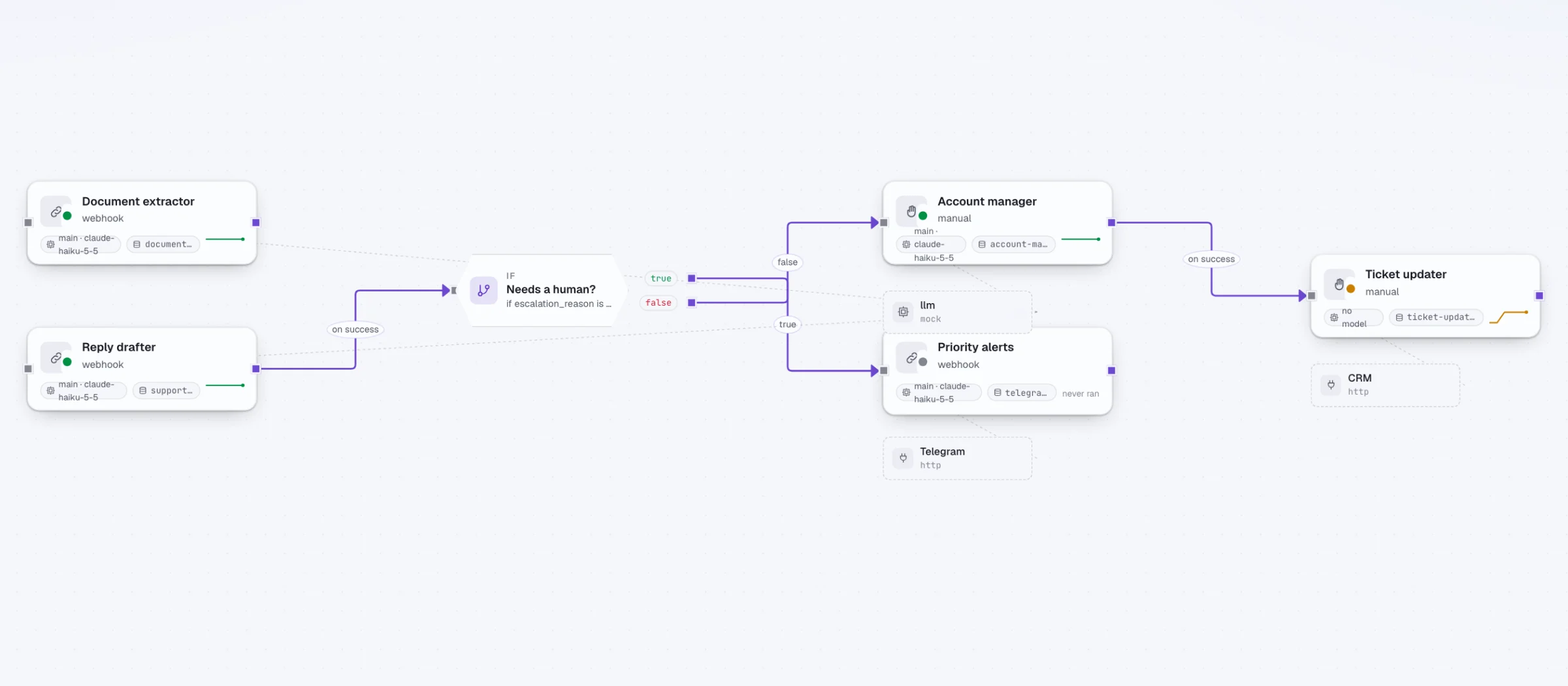
The canvas. Agents drawn in a project and linked by control edges, with a condition gate between them. 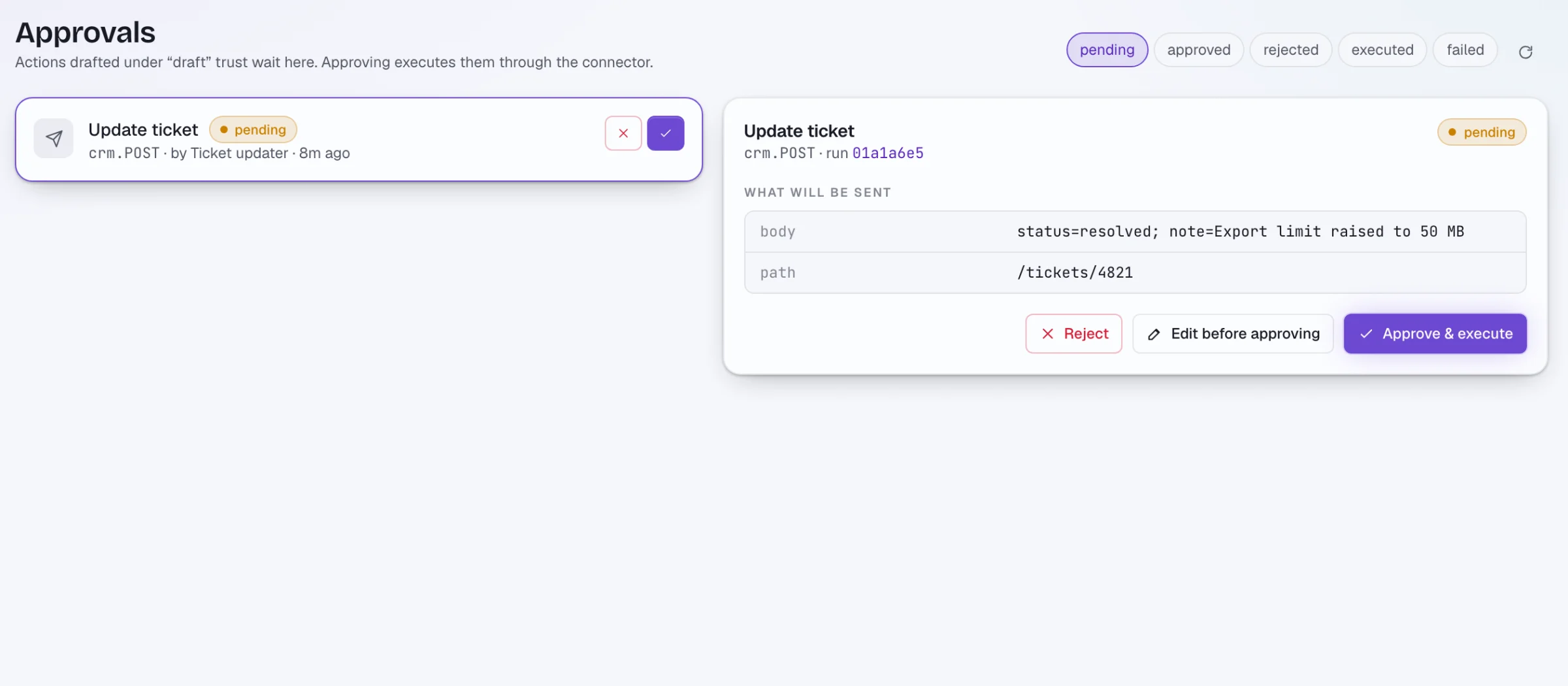
The approval queue. A drafted action waits for a person. The exact arguments it will send are shown, with Reject, Edit and Approve. 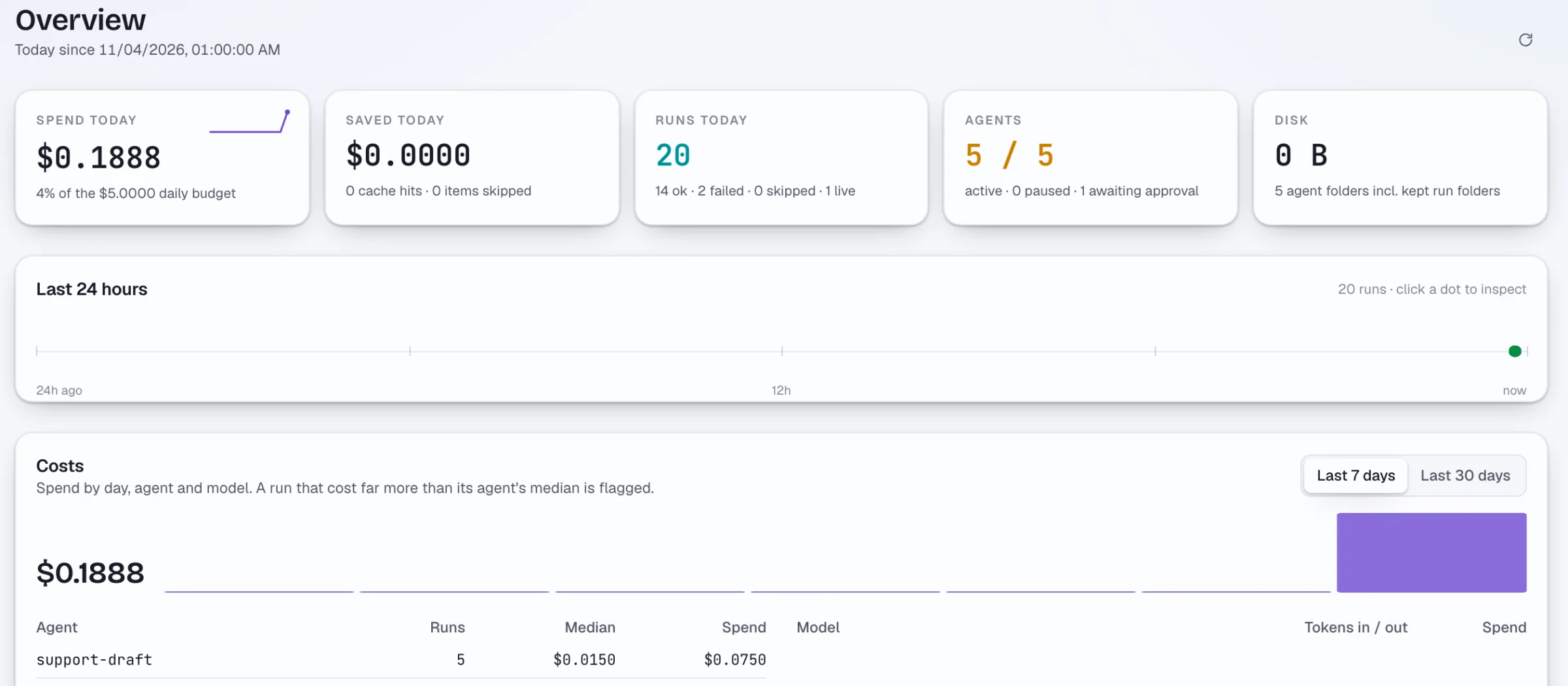
Spend and runs. Spend today against the daily budget, runs today, and costs by agent and by model. 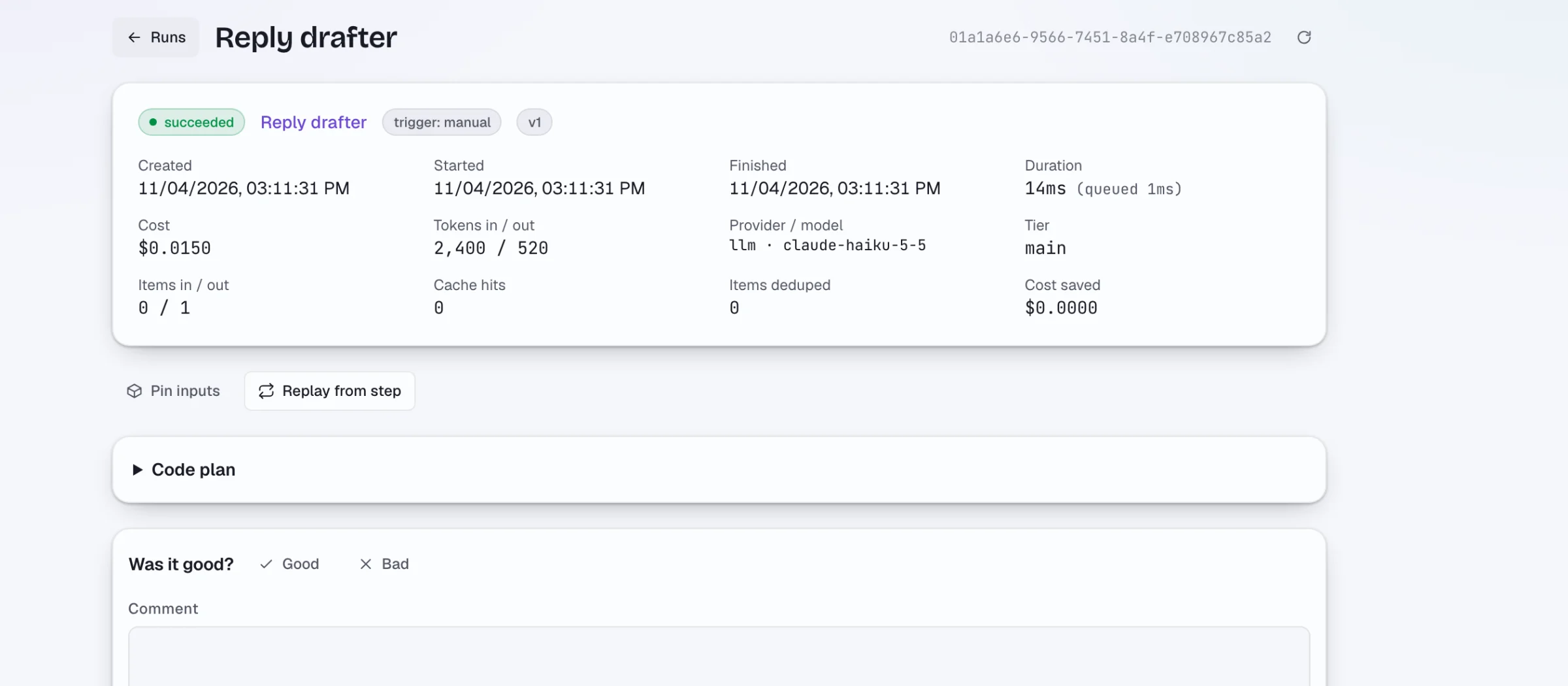
One run, in detail. Status, duration, cost, tokens and the model that answered.
Builder and triggers
An agent is one job described in plain sections, drawn on a canvas inside a project.
-
Canvas of independent agents
Draw agents inside a project and link them. Agents do not call each other directly; they publish records that other agents wake on. Projects can link to each other, and a project can model an employee.
-
One job per agent
An agent is described in plain sections: trigger, inputs, task (model, skills, tools, transforms), model tier, output schema, actions, limits and safety, permissions, memory and savings.
-
Five kinds of triggers
Schedule with a timezone per agent, new record in a collection (debounced), webhook, manual run, or an upstream agent finishing.
-
Typed, validated output
Output is parsed and validated against a JSON Schema. On a schema failure the run retries and can fall back to another model.
-
Launch parametersChecked on a running stack
Typed run parameters in 7 types, a Run dialog, webhook JSON and multipart, and files delivered to the run. Checked on a running stack in five of six scenarios.
-
Agent calls agent as a function
An agent can call another as a tool, to a depth of 3, with cycle protection, a timeout and the parent's budget. Not yet checked live with a real model key.
-
Versions and drafts
Versions with diff and rollback, drafts and publish, pinned inputs, and export and import of agents as JSON.
-
Draft an agent from text
Describe the job in words and get a draft agent to edit.
-
SkillsChecked on a running stack
Reusable instruction blocks with version history and one-click restore. Stale edits are rejected. Checked in a browser against a real API and database.
-
Project knowledge base
Entries with audience tags, available to the project's agents.
Runs and workflows
How agents are executed, chained, repaired and replayed.
-
A fixed run pipeline
Every run passes the same steps: gates (enabled, not paused, not already active, budget), memory, inputs, formulas, task, store, actions, run log.
-
Queue and workers
A worker pool on a PostgreSQL queue, with recovery of stale runs on start.
-
Logic gates
8 gate types between agents: condition, schedule (weekdays, hours, dates), filter, switch, delay, join, limit, and wait for a record or signal with a timeout.
-
Resume from a checkpoint
A failed run resumes from its checkpoint without repeating side effects.
-
Fork and replay
Replay a run from any step with patches to input, prompt or model. Tools with side effects run as dry runs.
-
Canary releases
Send part of the work to a new agent version, then promote it or stop.
-
Swarm mode
Inside one task a planner model splits the work, workers run in parallel, and a reviewer merges the result into validated records.
-
Auto-pause
An agent that fails three runs in a row pauses itself. Resume it, or reset its cursors and dedupe.
-
Input cursors
Exact numeric ordering and atomic progress commits, so an agent does not skip or repeat records.
-
Cross-project links
An edge or event trigger can target another project's agent, gate or collection when its share policy allows. Checked when you save and when it runs.
Models and routing
Use hosted or local models, and let the router choose.
-
Provider gallery
25 provider presets, including Anthropic, OpenAI, Gemini, DeepSeek, Mistral, xAI, Groq, Together, OpenRouter, Ollama, LM Studio and vLLM, plus command-line agent providers and a voice provider. The endpoints were probed; not every provider has been used in depth.
-
Local models
Run models without API keys through a bundled Ollama profile, LM Studio or vLLM.
-
Model catalogue
A catalogue snapshot covering 232 providers supplies model prices, context size, tool, vision and reasoning flags, and a quality class from 1 to 5.
-
Automatic routing
The router picks the cheapest enabled model that meets the needed tools, vision, context size and quality floor, escalates on failure, and logs the choice and the alternatives.
-
Learned cascade
Attempts are recorded per task class, and the next run starts on models that proved themselves (14-day window, at least 5 observations, 0.8 success rate by default). You can ban or override.
-
Small decision model
An optional small typed model chooses tier, retry or escalation. If it fails, routing falls back to deterministic rules.
-
Shared providers
Define a provider once at system level and use it from several projects.
-
Circuit breaker per providerIn progress
The breaker and provider health are built; wiring the fallback into the runner is still pending.
-
Token counting before sendingIn progress
Exact counting for one provider on a flag, estimates elsewhere. Partly built.
Costs and budgets
Spend limits that stop a run, and savings that are on by default.
-
Budgets
Limits per run, per agent per day and per project per day (local midnight in the agent's timezone). A run over budget is skipped with a budget error. A project's LLM spending can be stopped and resumed.
-
Savings on by default
Input dedupe by hash, an exact-match response cache (temperature 0, 24 hours), and provider prompt caching of the stable prefix. The overview shows spend and what was saved.
-
Atomic budget reservation
Parallel agent calls reserve budget atomically, so they cannot overspend together.
-
Cost report and predictor
A cost report per project and an estimate of what a run will cost.
-
Embedded price listIn progress
A built-in list of model prices, where your own price always wins and an unknown price is counted in a metric. Built, not switched on yet.
-
Subscription providersIn progress
Claude Code and Codex on a vendor subscription: cost is recorded as zero, turns and seconds are tracked, limits come from a spend guard. Tested with fake command-line tools; no run on a real subscription yet.
Memory
Each project keeps its own persistent memory.
-
Persistent project memory
Memory is recalled before a run and saved after it. If the memory service is down, the run continues.
-
Memory is private per project
A project writes only to its own namespace and reads its own plus a read-only shared layer. Other projects only if the share policy says so. A security review found and fixed nine leaks in this layer, each with a regression test.
-
Audience levels
Internal, client and public levels filter what an agent facing outside people may read from memory.
-
Consolidation and coverage views
See how memory is consolidated and how much of the work it covers.
-
"Memory required" policyIn progress
Automatic recall and save with coverage metrics. The code is ready; it is not switched on yet.
Connectors and tools
Connect services and expose agents to other systems.
-
Connector gallery
61 presets: browser (Playwright, Chrome DevTools), mail (Gmail, Microsoft 365, IMAP and SMTP), chat (Slack, Telegram, Discord, WhatsApp Business), dev (GitHub, GitLab, Git, Sentry, shell, filesystem, AWS), data (Postgres, MySQL, MongoDB, Redis, SQLite, BigQuery, Airtable), docs (Google Calendar and Drive, Notion, Confluence, Jira, Linear), CRM and commerce (HubSpot, Salesforce, Shopify, Stripe, Bitrix24), bridges (Zapier, Composio, n8n), search, speech-to-text and social networks. Connectors differ in how far they have been exercised.
-
Encrypted credentials
Credentials declared by a preset go into an AES-256-GCM vault. The connection is tested and its tools are listed before you save.
-
Any MCP server or REST API
Add an MCP server (stdio or streamable HTTP) or a REST API by hand.
-
Connector scope
A connector caps what an agent may do with it: act, draft or read. Browsers, shell, files and git default to act; messaging and issue trackers to draft; search, databases and memory to read.
-
Google sign-in
Gmail, Calendar and Drive sign-in through an OAuth client that you supply.
-
Honest connection status
A connection is labelled "tools listed" instead of "verified", because listing tools does not prove a token has the rights for every operation.
-
Publish an agent outward
An agent can be exposed as an A2A endpoint, a website chat widget, or an inbound email address, each with its own token, audience and rate limit.
-
Per-operation risk contractsIn progress
Risk contracts exist for 11 presets, with a strict mode. The code is ready; the backfill has not been run.
-
Social connectorsIn progress
Instagram, Facebook, Threads, YouTube, X, TikTok and LinkedIn, each as API and browser variants, with signed-URL upload limits. Live acceptance and automatic social sign-in are still open.
Browser, desktop and code execution
Agents that use a browser, your Mac, files, or run code in isolation.
-
Headless browser
Chromium with Playwright MCP inside the API image, and Chrome DevTools MCP.
-
Screenshots for vision models
Screenshots go to vision models as image blocks; text-only models get a placeholder.
-
Control your own Mac
Through a token-protected bridge an agent can see the screen, click, type, switch apps and windows, use menus and the clipboard. macOS only, with permissions and the bridge set up by hand.
-
Host agent with allowlist
Access to files on the host through a per-project path allowlist and a hard denylist (SSH keys, cloud credentials, keychains).
-
Word and Excel
Read and write local docx and xlsx files.
-
Isolated code execution
A Python sandbox tool and agent command-line tools run in per-job containers: read-only root, dropped capabilities, bounded CPU, memory and processes, mutual TLS to the executor, and an egress allowlist proxy. Component-tested in disposable containers; not run with real vendor subscriptions.
-
Git worktree gates
Parallel code work in separate worktrees with fork and merge gates. No push and no force. The end-to-end run used a test double of the coding tool.
-
Video and speech
A video rendering tool from templates, and text-to-speech with a hosted or local voice.
-
Logged-in browser profilesIn progress
Saved browser sessions, encrypted in the vault, for publishing through a browser. The code is in progress.
Approvals and policy
People stay in charge of anything risky.
-
Trust ladder
Effective trust is the lower of the action's trust and the connector's scope. Read skips, draft creates a pending approval, act runs now.
-
Approval queue
The approver can edit the action's arguments before running it, and disclosure is checked again after the edit.
-
Ask a person mid-runChecked on a running stack
An agent can pause and ask a question. It shows in the interface and in Telegram, and the answer resumes the run. Checked on a running stack.
-
Pre-approvals
Approve one exact publication in advance: bound to the text hash and file hashes, a window of plus or minus 15 minutes, single use.
-
Policy per project and per agent
Allow and deny tools, require approval for patterns, allow and deny hosts for every URL in arguments, deny regexes over arguments and output, quiet hours, per-run caps, read-only mode, and plain-language rules added to the prompt. Deny wins.
-
Risk check can downgrade
The decision model can downgrade an act to a draft.
-
Secret leak scanning
Outputs are scanned for leaked secrets.
-
Security reviews with a defect register
Every finding has a regression test. Fixed so far include webhook authentication before the body is read, memory scoping, file-write races, and redirect and host rules.
-
Content guardrailsIn progress
Detect secrets, card numbers, IBANs, emails, phone numbers and prompt-injection markers, before and after the model, with block, warn or log. Built, off by default, not switched on yet.
-
Tool results as untrusted dataIn progress
Injection markers in tool results are flagged. Partly built.
Evals and quality
Test agents the way you test code.
-
Evaluators
Up to 16 per agent, in 10 kinds: json_schema, regex, contains, not_contains, tool_called, tool_not_called, max_steps, max_latency_ms, max_cost_usd and llm_judge. With sampling, and auto-pause when the score drops below a threshold.
-
Golden datasets and comparison
Build datasets from real runs, replay them without side effects, compare two versions or models by score, and see a table of quality against cost.
-
Annotations and review queue
Mark runs and work through a queue of runs to review.
-
Synthetic acceptance sets
Typical, adversarial and injection cases to try an agent against.
-
Prompt optimisationIn progress
Candidate prompts are scored on datasets, and a new version goes through approval. Built, not switched on yet.
-
Error feedIn progress
Failed runs grouped by error signature. Built, not switched on yet.
Observability
See what ran, what it cost and what failed.
-
Prometheus metrics and alerts
Metrics at /metrics with an optional separate scrape token, and 11 alert rules with a test file.
-
Structured logs
JSON logs with a request id, and recovery middleware.
-
Run logs and tool journal
Per-run log lines, live logs in the interface, an executor tool journal and invocation review.
-
Disk monitor
Alerts when the remaining disk space drops below 15% and below 5%.
-
OpenTelemetry tracingIn progress
Spans from run to step to model call to tool to action, with tokens and cost. Off unless an endpoint is set. Built, not switched on yet.
API, webhooks and MCP
Drive LOOPmKit from outside, or let other systems call an agent.
-
REST API
Under /api/v1 with a bearer token, plus health and readiness endpoints.
-
Per-agent webhooks
POST with JSON or multipart. The token is checked before the body is read.
-
Export and import
Whole projects and single agents as JSON.
-
Product tasksChecked on a running stack
Durable work orders with an idempotency key, a stale-revision check, cancel, and exactly-once dispatch. Checked on a running stack with a scripted model.
-
LOOPmKit as an MCP serverIn progress
11 tools: list projects, agents, runs, questions and approvals; get a run; run an agent; answer a question; approve or reject an action; create an agent draft. Mutating tools are marked, and a read-only switch removes them. Built, not switched on yet.
-
Voice commandsIn progress
A voice command endpoint, a Mac microphone helper and Telegram voice with local speech-to-text. Partly built; live status per scenario is not proven.
-
Phone agentIn progress
Real-time speech to model to speech over a phone line. The code exists; this is in progress.
Web interface
Where you build, run and review.
-
Canvas and workspace
A Nuxt web interface with a node canvas. Project tabs: Overview, Agents, Graph, Connectors, Providers, Secrets, Skills, Collections, Runs and Approvals. Plus pages for projects, runs, company, products, inbox, settings and shared providers.
-
Agent editor
A sectioned form and a JSON view, a templates dialog, a permissions editor with an effective-policy view, and panels for canary, versions and prompt optimisation.
-
Works at phone widthChecked on a running stack
The company wizard and product passport were checked at 390 px and 1360 px in a browser against a real API and database.
-
Owner cockpitIn progress
A single place for questions and approvals. Inbox exists; the cockpit is an open acceptance item.
Templates and company setups
Start from a template, or set up a team of role agents in one step.
-
Template gallery
23 templates: 8 task scenarios and employee roles. Defaults are cautious: an agent is created disabled, with one dollar per run and five per day.
-
Company wizardChecked on a running stack
An editable team: 10 roles by default, 32 roles at most. It comes with a mission, a shared chat provider, budgets, instructions, manager links and allowed colleague calls. One transaction creates projects, skills and inbox agents, and a retry after a lost response gives the same company. Checked in a browser with a scripted model and no outside actions.
-
Product passportChecked on a running stack
Repository, branch, environments, requirements, owners, docs, runbook and archive in one record, with optimistic revision control. Checked the same way.
-
Stack-specialist developer roles
Go, PHP, Vue, database, DevOps, mobile, QA and tech-lead roles with stack skills and a "not my area, ask this colleague" routing. Probed with three cheap live calls.
-
Full development cycleOn the roadmap
Task, plan, development, review, tests, preview and release approval as one chain. The cross-checks are not finished.
Deployment
Self-hosted with Docker Compose.
-
Docker Compose stack
PostgreSQL 18, a memory service, the API, the web interface, a search service and speech-to-text, with an optional local-model profile.
-
API image
Runs as a non-root user with Node, Python, Chromium, Playwright MCP, the agent command-line tools and git.
-
Database migrations
Versioned, safe to run concurrently, and safe to stop with SIGTERM.
-
Backup and restore
A backup and restore script with a restore test.
-
Release tooling
Automated release notes and a one-command setup that leaves an existing configuration untouched.
-
Telemetry off by default
The product sends nothing home unless you turn it on.
-
Kubernetes and HelmOn the roadmap
Named on the backlog. No chart exists yet.
Nothing matches. Clear the filters.
Anything not listed here is not part of the product today. The status page lists the known limits.
Token economy.
What keeps the bill small, and where you can see each part at work.
- 01
Never twice
How it saves
Every input is hashed. An input the agent has already handled is skipped, so the model is not asked about it again.
Where you see it
The run page shows items deduped, and the overview shows items skipped.
- 02
Remembered answers
How it saves
An identical request at temperature 0 gets the stored answer for 24 hours instead of a new call. Templates start with this switched off.
Where you see it
Cache hits on the run page, and the saved amount on the overview.
- 03
The stable start, cached
How it saves
The unchanging beginning of a prompt is cached by the provider, so repeated runs pay less for the same prefix.
Where you see it
The overview shows what the savers kept.
- 04
The cheapest model that fits
How it saves
In auto mode the router picks the cheapest enabled model that has the tools, vision, context and quality the task needs, and moves up only when a model fails.
Where you see it
The choice and the alternatives are written to the run log.
- 05
A cascade that learns
How it saves
For each kind of task LOOPmKit remembers which models succeeded and starts the next run on one with a proven record: 14 days, at least 5 attempts and an 80 percent success rate by default.
Where you see it
You can ban or pin a model by hand.
- 06
A ceiling on every level
How it saves
Budgets sit on every run, on every agent per day and on every project per day. A run over its cap is skipped with a budget error, and parallel calls reserve their share first.
Where you see it
The error on the run page, and spend against the daily budget on the overview.
- 07
Every token counted
How it saves
Each run records tokens in and out, cost, provider and model.
Where you see it
The run page, and costs by agent and by model on the overview.
- 08
Models on your own machine
How it saves
Ollama, LM Studio or vLLM answer on your hardware, with no API key.
Where you see it
A local provider is set up like any hosted one.
Cost is only as exact as the prices set for the provider.
Early access starts with a call
The product is at an early stage with a single operator. The repository is private and the terms are not set. If this fits a problem you have, book a short call.
A 20-minute call with the author. The repository is private, so a conversation is the way in.